Mounting
Five ways to tidy away the cables under your desk
From ten minutes with Velcro to a cable tray under the desktop. Five solutions, with an honest note on what each one does and doesn't fix.
MODUXO
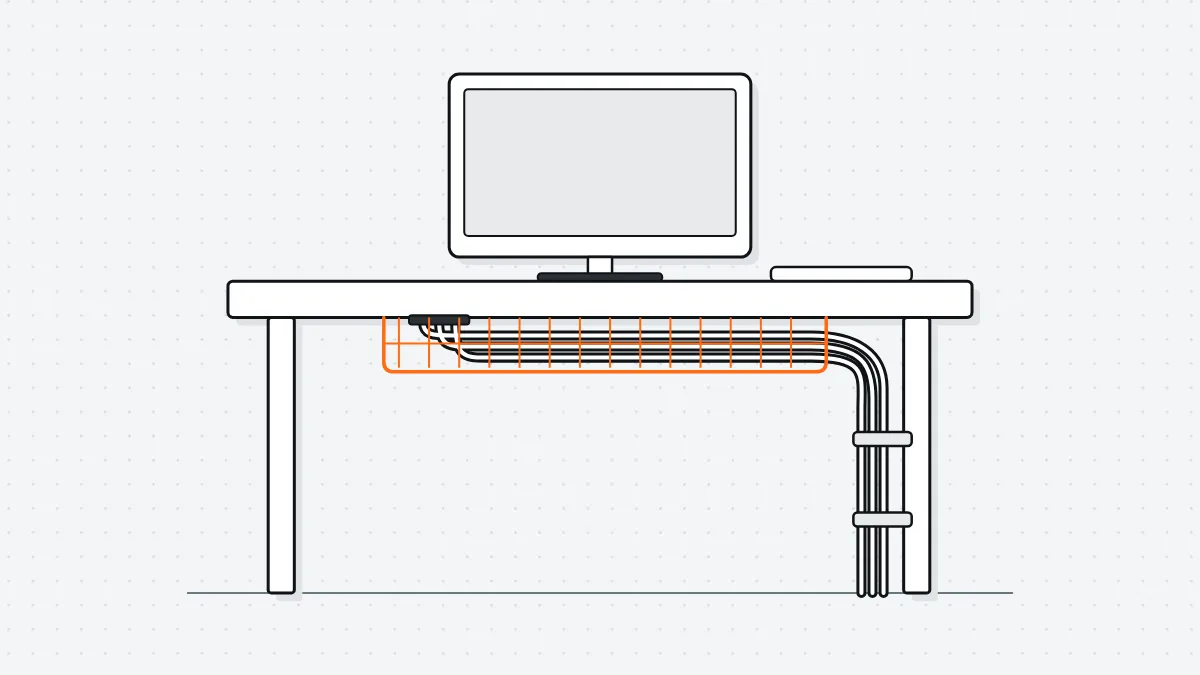
A desk gets messy in the place you never look: underneath. Below are five ways to deal with it, from quick and cheap to neat and permanent. Pick one, or combine the first with any of the others.
1. Velcro and nothing else (10 minutes)
Unplug all the cables, lay them side by side and bundle them every 20 centimetres with Velcro straps. That's all there is to it. It sorts out the dangling spaghetti and you can always add another cable later.
Does: costs next to nothing, always reversible. Doesn't: the bundle still hangs visibly under your desktop.
2. A cable tray under the desktop (30 minutes)
An open tray that you screw to the underside of the desktop. Everything goes in it, you don't see any of it any more, and you can simply drop another cable in later.
When fitting it, mind the thickness of your desktop: never use a screw longer than the top is thick, minus 3 mm. With an 18 mm top that means screws of 15 mm at most, or you'll come straight through the top of your desk. On a height-adjustable desk, fix the tray to the top, not the frame, and allow for the highest position.
Does: neat, easy to add to. Doesn't: you'll have to drill.
3. A cable tube or sleeve down to the floor (15 minutes)
Run the bundle that goes from your desk to the extension lead through a flexible tube or a fabric sleeve. That's the only bundle you still see when you're standing in the room, so that's where it makes the biggest difference.
Does: cheap, no tools. Doesn't: adding a cable means redoing the whole sleeve.
4. A tray or shelf under the desktop (45 minutes)
The extension lead, your laptop charger and the loose adapters go into an open tray hung under the desktop. Those brick-like adapters are then no longer hanging from their own cables — the most underrated reason an adapter gives up after two years.
Make sure the tray is open or has holes in it. Power supplies get warm and a closed plastic box traps that heat.
Does: takes the weight off the adapters. Doesn't: eats into your legroom if you hang it too low.
5. Everything off the desk (an hour, once)
The dock, the network switch and the power supplies don't need to be on your desk. Put them on a shelf against the wall or on the side of the desktop, and run a single cable to your laptop. You can then clear your desk in one go.
Does: the calmest end result. Doesn't: you'll need longer cables; measure first.
What we do ourselves
Velcro round everything, a tray under the desktop and the adapters in an open tray. That's about an hour's work, and after that you never have to look at it again — unless you add a cable, and then it takes thirty seconds.